Know what your tests actually protect.
Behaviorproof models your product as scenarios and derives coverage, confidence, gaps and exposure from the evidence behind each one, so you measure business-behavior protection, not test counts.
Every metric is derived, not authored. No test-count vanity numbers.
Scenario
CH-0142: Checkout applies promo code
Coverage
72%
Confidence
High
Exposure
Elevated
Protection
2 of 3 layers
Top gap
No automated coverage on the expired-code path.
A more honest way to measure QA
Everything is built around one idea: protection quality of real business behavior. Here is what that gives you.
Scenario repository
Model your product as scenarios inside a project and component tree. The scenario is the source of truth; everything you see is derived from it.
Derived confidence and coverage
Every scenario's coverage, confidence and protection depth are computed from the evidence attached to it, never typed in by hand and never gamed by a test count.
Gaps and exposure
See exactly which critical behaviors are under-protected. Exposure weighs risk against real coverage so you triage what actually matters first.
CI results, mapped back
Post JUnit XML or Playwright JSON from any pipeline. Results are parsed, matched to scenarios and folded into the intelligence, including flaky-retry signals.
Evidence of every kind
Manual checks, automated suites and ad-hoc exploration each count toward protection. Waivers and gap triage keep the picture honest where coverage is deliberate.
Workspaces and roles
Multi-workspace tenancy with viewer, contributor and admin roles, an audit log of every change, and scoped API tokens for your automation.
Bulk import and export
Bring an existing catalog in from CSV or JSON and take it back out just as easily. No lock-in on the data you author.
Trends you can trust
Nightly snapshots record real history instead of reconstructing it, so coverage and confidence trends reflect what was actually true on each day.
One dashboard, tuned to whoever is looking
The same derived data answers very different questions for an exec, a product owner, a QA lead and a developer. Apply a preset board in one click, then add, remove, reorder and scope widgets until it fits exactly how your team reads coverage.
Are we protected, what did we accept, and which way is it moving?
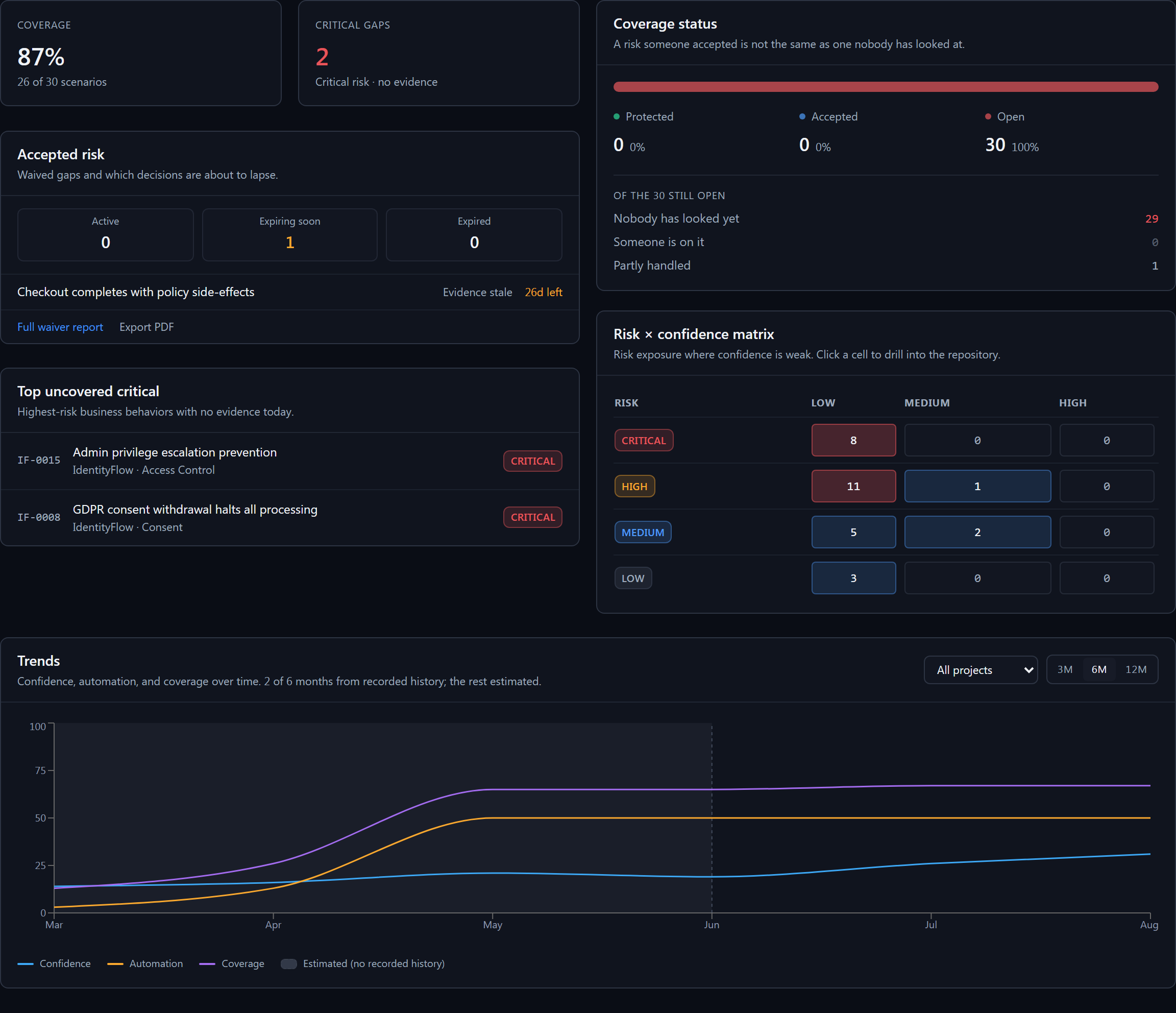
Live product, seeded demo workspace. Every number shown is derived from scenario evidence.
Start from a preset
Executive, Product, QA Lead or Developer, applied in one click. Or begin from a blank board.
Add what you need
Mix in any of more than two dozen widgets across coverage, gaps, trends and automation.
Arrange and repeat
Reorder the board, and pin a widget more than once, for example one per sprint or environment.
Scope and share
Point any widget at a saved view, then share the whole board by URL. Your layout is remembered.
The widget library
More than two dozen to choose fromSlice the repository, then save the view
Filter by risk, coverage, confidence, owner, tag or linked story. Save any combination as a named view, switch between the views you use most, or clear them to see the full list unfiltered. Every view, and every scoped widget that points at one, is shareable by URL.
- Keep several saved views side by side, not one filter you must keep resetting.
- One click clears back to the full, unfiltered list.
- Scope a dashboard widget to any saved view for a focused KPI.
Saved views
From scenarios to signal in three moves
No score to maintain, no spreadsheet to reconcile. Author the behavior, attach the evidence, read the result.
Model the behavior
Capture the scenarios that describe what your product must do, organized by project and component.
Attach the evidence
Add manual, automated and ad-hoc checks, or post CI results straight from your pipeline. No score to maintain by hand.
Read the intelligence
Coverage, confidence, gaps and exposure are derived on the spot, then tracked over time so you see where protection is thin.
Four derived signals, one clear priority
Each is computed from the evidence on a scenario. Together they tell you where to look next.
Coverage
How much of a scenario's behavior is exercised by evidence, across layers.
Confidence
How much you can trust that coverage: recency, breadth and flakiness of the evidence.
Gaps
The specific protection a scenario is missing, ranked so the next action is obvious.
Exposure
Risk left unprotected. High-risk behavior with thin coverage rises to the top.
See where your coverage is really thin.
Spin up a workspace, model a few scenarios and watch the intelligence build itself.